Menggunakan Nginx sebagai reverse proxy adalah strategi populer untuk meningkatkan performa, keamanan, dan skalabilitas aplikasi Node.js dan PHP di production.
Nginx bertindak sebagai lapisan depan yang menerima semua request, menangani SSL, caching, rate limiting, lalu meneruskan request ke backend aplikasi.
Artikel ini membahas konfigurasi, optimasi, dan best practice untuk setup reverse proxy Nginx di lingkungan production.
Contents
- 1 1. Mengapa Menggunakan Reverse Proxy?
- 2 2. Arsitektur Reverse Proxy Nginx
- 3 3. Konfigurasi Nginx untuk Node.js
- 4 4. Konfigurasi Nginx untuk PHP-FPM
- 5 5. Reverse Proxy untuk Multiple Apps
- 6 6. SSL Termination dan Security
- 7 7. Best Practices Reverse Proxy Nginx
- 8 8. Studi Kasus
- 9 9. Kesimpulan
- 10 Related Posts
1. Mengapa Menggunakan Reverse Proxy?
Reverse proxy memberikan beberapa keuntungan untuk aplikasi Node.js atau PHP:
- Load Balancing
- Nginx bisa mendistribusikan request ke beberapa backend, meningkatkan skalabilitas horizontal.
- SSL Termination
- Nginx menangani SSL/TLS → backend cukup HTTP → mengurangi beban CPU aplikasi.
- Caching
- Konten statis atau halaman populer dapat di-cache di Nginx → mengurangi load backend.
- Security Layer
- Rate limiting, DDoS mitigation, header hardening.
- Unified Entry Point
- Mengelola multiple aplikasi di satu domain/subdomain dengan path-based routing.
2. Arsitektur Reverse Proxy Nginx
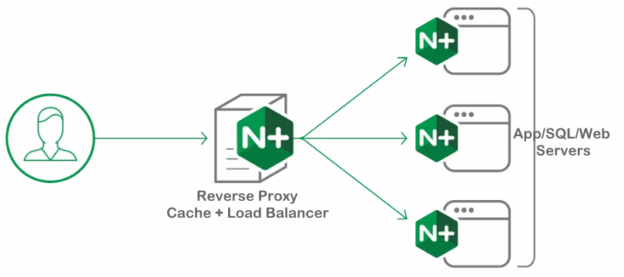
Contoh arsitektur:
Client → Nginx (SSL, caching, rate limiting) → Backend
                                     ├─ Node.js app (port 3000)
                                     └─ PHP-FPM (port 9000)
- Nginx menerima request HTTP/HTTPS
- Memilih backend berdasarkan URL atau domain
- Menangani static content langsung tanpa melewati backend
3. Konfigurasi Nginx untuk Node.js
3.1 Setup Node.js Backend
- Node.js mendengarkan di port internal (misal 3000)
- Contoh minimal Express app:
const express = require('express');
const app = express();
app.get('/', (req, res) => res.send('Hello from Node.js!'));
app.listen(3000, () => console.log('Server running on port 3000'));
3.2 Nginx Reverse Proxy Config
server {
    listen 80;
    server_name node.example.com;

    location / {
        proxy_pass http://127.0.0.1:3000;
        proxy_http_version 1.1;
        proxy_set_header Upgrade $http_upgrade;
        proxy_set_header Connection 'upgrade';
        proxy_set_header Host $host;
        proxy_cache_bypass $http_upgrade;
    }
}
Penjelasan:
proxy_set_header Upgrade/Connection→ diperlukan untuk WebSocket di Node.jsproxy_cache_bypass→ bypass cache untuk upgrade request (WebSocket)
3.3 Optimasi
- Gunakan gzip compression:
gzip on;
gzip_types text/plain text/css application/json application/javascript text/xml application/xml application/xml+rss text/javascript;
- Aktifkan keep-alive:
keepalive_timeout 65;
- Rate limiting optional untuk API endpoint:
limit_req_zone $binary_remote_addr zone=api:10m rate=20r/s;
4. Konfigurasi Nginx untuk PHP-FPM
4.1 Setup PHP-FPM
- PHP-FPM mendengarkan socket UNIX atau port TCP (misal 9000)
- Contoh PHP file:
/var/www/html/index.php
<?php
echo "Hello from PHP-FPM!";
4.2 Nginx Reverse Proxy untuk PHP
server {
    listen 80;
    server_name php.example.com;
    root /var/www/html;

    index index.php index.html index.htm;

    location / {
        try_files $uri $uri/ /index.php?$query_string;
    }

    location ~ \.php$ {
        include snippets/fastcgi-php.conf;
        fastcgi_pass 127.0.0.1:9000;
        fastcgi_param SCRIPT_FILENAME $document_root$fastcgi_script_name;
        include fastcgi_params;
    }
}
Penjelasan:
try_files→ memastikan request file ada, fallback ke index.phpfastcgi_pass→ meneruskan request ke PHP-FPM backend
4.3 Optimasi
- Cache opcode PHP-FPM menggunakan OPcache
- Batasi request body untuk upload:
client_max_body_size 20M;
- Gzip untuk konten teks:
gzip on;
5. Reverse Proxy untuk Multiple Apps
Startup sering menjalankan Node.js + PHP dalam satu domain/subdomain:
server {
    listen 80;
    server_name example.com;

    # Node.js API
    location /api/ {
        proxy_pass http://127.0.0.1:3000;
        proxy_http_version 1.1;
        proxy_set_header Upgrade $http_upgrade;
        proxy_set_header Connection 'upgrade';
        proxy_set_header Host $host;
    }

    # PHP Web App
    location / {
        root /var/www/html;
        index index.php index.html index.htm;

        location ~ \.php$ {
            include snippets/fastcgi-php.conf;
            fastcgi_pass 127.0.0.1:9000;
            fastcgi_param SCRIPT_FILENAME $document_root$fastcgi_script_name;
            include fastcgi_params;
        }
    }
}
/api/→ Node.js backend/→ PHP-FPM- Nginx mengatur traffic → backend tetap terisolasi
6. SSL Termination dan Security
- Nginx bisa handle SSL/TLS untuk semua backend
server {
    listen 443 ssl http2;
    server_name example.com;

    ssl_certificate /etc/nginx/certs/example.crt;
    ssl_certificate_key /etc/nginx/certs/example.key;

    # Node.js API
    location /api/ {
        proxy_pass http://127.0.0.1:3000;
        proxy_set_header Host $host;
        proxy_set_header X-Real-IP $remote_addr;
    }

    # PHP Web
    location / {
        root /var/www/html;
        index index.php index.html index.htm;
        location ~ \.php$ {
            include snippets/fastcgi-php.conf;
            fastcgi_pass 127.0.0.1:9000;
            fastcgi_param SCRIPT_FILENAME $document_root$fastcgi_script_name;
            include fastcgi_params;
        }
    }
}
- Tambahkan rate limiting, DDoS mitigation, dan security headers untuk proteksi tambahan.
7. Best Practices Reverse Proxy Nginx
- SSL termination di Nginx → backend HTTP cukup
- Caching static assets → kurangi load backend
- Rate limiting → untuk API endpoint / login page
- Keep-alive connections → efisiensi TCP
- Load balancing → bisa menambah backend Node.js/PHP di masa depan
- Monitoring → Pantau RPS, latency, error rate
- Separate backend → Node.js dan PHP-FPM isolated untuk maintenance
8. Studi Kasus
Startup Marketplace:
- Node.js API backend di port 3000 → handle AJAX & WebSocket
- PHP web frontend di PHP-FPM → port 9000
- Nginx reverse proxy: SSL termination + caching + rate limiting
Hasil:
- Response time API <150ms
- Load backend berkurang 60% karena caching static assets
- Upgrade backend dapat dilakukan tanpa downtime
- Aplikasi scalable dengan penambahan server baru mudah
9. Kesimpulan
Reverse proxy Nginx untuk Node.js dan PHP memberikan manfaat:
- Performa: caching, keep-alive, compression
- Keamanan: SSL, rate limiting, DDoS mitigation
- Skalabilitas: load balancing & multiple backend
- Maintenance mudah: isolasi backend, unified entry point
Dengan konfigurasi yang tepat, startup dapat menjalankan Node.js dan PHP secara bersamaan dalam satu domain/subdomain, tetap hemat resource, aman, dan scalable untuk produksi.